
Cloud-Based Software vs Traditional Software: Which Is Better for Your Business?
Comparing Cloud-Based Software vs Traditional Software. Discover key differences, cost structures, security considerations, and how to choose the right software solution for your business growth.
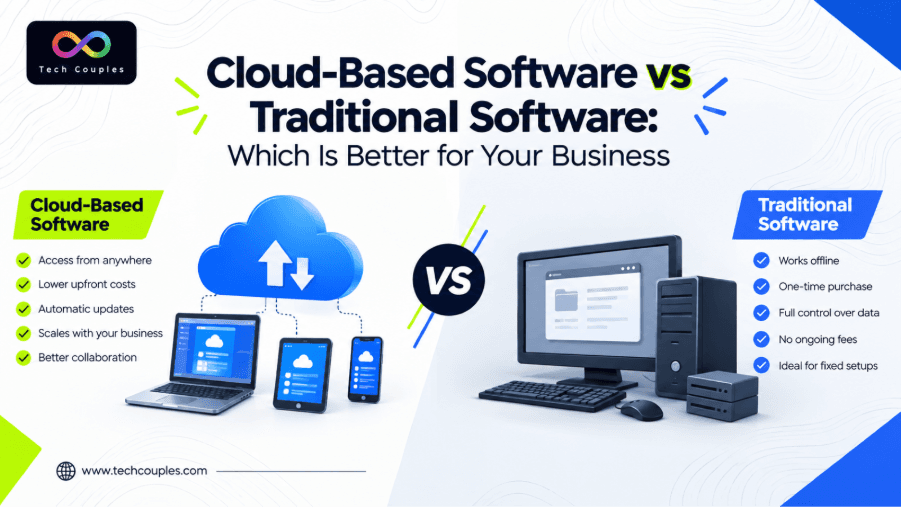
Choosing the right software can have a direct impact on how smoothly a business operates. From managing employees and customers to storing important information, businesses rely on software for everyday tasks. But when it comes to choosing between Cloud Based Software vs Traditional Software, many business owners are unsure which option is the better investment.
Traditional software has been used by businesses for many years, while cloud technology has changed the way companies access and manage software. Cloud solutions can be accessed through the internet and are designed to provide flexible, on-demand access to applications and computing resources.
So, should your business stay with traditional software or move to the cloud? Let's compare both options in simple terms.
What Is Cloud-Based Software?
Cloud-based software is software that is hosted on remote servers and accessed through the internet. Instead of installing and maintaining everything on individual office computers, users can generally access the application through a browser or supported device.
This approach has become popular with businesses that have remote teams, multiple locations, or employees who need access to information while working outside the office.
For example, a company can use cloud-based business software to manage employees, projects, customer information, documents, or other daily operations from a central platform.
NIST describes cloud computing as providing convenient, on-demand network access to shared computing resources that can be provisioned and released with relatively little management effort.
What Is Traditional Software?
Traditional software is commonly installed directly on a computer, company server, or local IT infrastructure. Depending on the software, the business may be responsible for installation, upgrades, maintenance, backups, and hardware requirements.
This model can still make sense for businesses with specific infrastructure requirements, strict internal processes, or software that needs to operate in a controlled local environment.
However, managing the infrastructure yourself can require additional time, technical knowledge, and resources.
Cloud Software vs Traditional Software: Key Differences
The biggest difference between the two models is where the software and supporting infrastructure are managed.
| Factor | Cloud-Based Software | Traditional Software |
|---|---|---|
| Access | Usually accessible online | Often tied to installed devices or local network |
| Installation | Minimal local installation | Usually requires installation |
| Maintenance | Often handled by the provider | Usually handled internally |
| Updates | Commonly delivered by the provider | May require manual updates |
| Scalability | Easier to scale as needs change | May require additional infrastructure |
| Remote Work | Well suited to distributed teams | Can require additional setup |
| Infrastructure | Provider-managed infrastructure | Business-managed infrastructure |
| Cost Structure | Often subscription-based | May involve upfront licensing and infrastructure costs |
The exact features and costs depend on the software provider, business size, contract, infrastructure, and requirements. Therefore, businesses should compare the total cost of ownership, rather than looking only at the initial price.
Benefits of Cloud-Based Software
One of the main reasons businesses are moving toward cloud solutions is flexibility.
1. Easier Access
Employees can access cloud applications from supported devices and locations with an internet connection. This can be especially useful for businesses with remote or hybrid teams.
2. Easier Scalability
A growing company may need more users, storage, or computing resources over time. Cloud environments are designed around on-demand resources and rapid elasticity, which can make scaling easier.
3. Reduced IT Management
With many cloud services, the provider manages much of the underlying infrastructure. This can reduce the amount of technical maintenance required from the business.
4. Regular Updates
Cloud applications can receive updates from the provider without requiring every employee to manually install a new version.
5. Better Support for Distributed Teams
When employees work from different offices or locations, having a centralized online system can make collaboration and information access more convenient.
These are some of the major Cloud software advantages, but they should always be considered alongside security, compliance, internet dependency, vendor reliability, and data requirements.
Traditional Software vs Cloud Software Cost: Which Is Cheaper?
Cost is one of the most important factors when comparing software.
The traditional software vs cloud software cost comparison is not always as simple as comparing a license price with a monthly subscription.
Traditional software may involve expenses such as:
- — Software licenses
- — Servers and hardware
- — Installation
- — IT support
- — Maintenance
- — Upgrades
- — Data backups
Cloud software may involve:
- — Monthly or annual subscriptions
- — User-based charges
- — Storage costs
- — Additional features
- — Internet connectivity
- — Migration or setup costs
A cloud solution may have a lower initial infrastructure burden, but long-term subscription costs need to be considered. On the other hand, traditional software may require a larger upfront investment but could have a different long-term cost structure.
The right choice depends on your business size, usage, technical requirements, and expected growth.
Security: Is Cloud Software Safe?
Security should never be treated as an afterthought.
Cloud services can provide strong security controls, but security also depends on the provider's architecture, configuration, access controls, encryption practices, backup strategy, compliance requirements, and the customer's own security practices.
NIST notes that cloud adoption involves both opportunities and security considerations, including confidentiality, integrity, availability, interoperability, and portability.
Before selecting a provider, businesses should ask:
- — How is business data protected?
- — Who can access the data?
- — How frequently is data backed up?
- — What happens if the service becomes unavailable?
- — Can data be exported if the business changes providers?
- — Does the provider meet relevant compliance requirements?
When Should Your Business Choose Cloud Software?
Cloud based software for business can be a strong option if your company needs flexible access, supports remote employees, expects to grow, or wants to reduce the burden of managing local infrastructure.
It may be particularly useful for startups and growing companies that want to avoid investing heavily in servers and hardware at the beginning.
Traditional software may still be appropriate when a business has specialized requirements, limited internet connectivity, existing infrastructure, or a strong reason to keep systems within its own environment.
Cloud vs Traditional Software: Which One Is Better?
There is no single answer for every company.
The Cloud vs traditional software decision should be based on your business goals rather than simply following the latest technology trend.
If your priority is flexibility, remote accessibility, easier scaling, and reduced infrastructure management, cloud software may be the better fit.
If your business requires highly controlled local infrastructure, specialized customization, or has specific operational constraints, traditional software may still be the right choice.
Before deciding, compare security, features, integrations, scalability, support, downtime risks, and the total cost of ownership.
Final Thoughts
The decision between Cloud Based Software vs Traditional Software ultimately comes down to what your business needs. Cloud solutions offer flexibility and convenient access, while traditional software can provide greater control over locally managed systems. Neither option should be selected simply because it is popular.
Businesses should evaluate their current workflow, budget, security requirements, team structure, and future growth before deciding. A careful comparison today can help prevent unnecessary technology costs and operational problems later.
For businesses exploring modern software solutions and digital transformation, techcouples can be a useful starting point for understanding available technology options.
Frequently Asked Questions
1. What is the main difference between cloud and traditional software?
Cloud software is generally hosted on remote infrastructure and accessed through the internet, while traditional software is commonly installed and managed on local devices or company infrastructure.
2. Is cloud software cheaper than traditional software?
Not always. Cloud software can reduce upfront infrastructure expenses, but subscription and usage costs should be compared with the complete cost of traditional software.
3. Is cloud-based software suitable for small businesses?
Yes. Small businesses can benefit from easier access, scalability, and reduced infrastructure management. However, the solution should match the company's budget and operational needs.
4. Is traditional software still useful?
Yes. Traditional software can be suitable for businesses with specific infrastructure, customization, security, connectivity, or operational requirements.
5. How should a business choose between cloud and traditional software?
Compare the software's features, security, scalability, integrations, support, accessibility, and total cost of ownership. The best option is the one that fits the company's current needs and future plans.
Need an engineering partner?
Let's architect your next digital system.